
Docs menu
How to migrate from Disqus and keep your comments
Before you start
- Admin access to your site in Disqus, to request the export.
- A Disfora account. The free plan covers one site and includes the import.
- Access to your site's template or theme, to swap the embed code at the end.
Step 1 Export your comments from Disqus
Sign in to Disqus and open your site's admin. Go to Community → Export (or straight to disqus.com/admin/discussions/export) and click Export Comments. Disqus builds the file in the background and emails you a download link. On a big site that can take a while.
The file ends in .xml.gz. Don't unzip it: Disfora reads it as it is.
Moved domains while you were on Disqus? Disqus stores a link for every thread, and that link is how each comment finds its page. Threads still pointing at an old domain are skipped. Fix them first with Disqus's migration tools (the domain migration wizard or the URL mapper), then export.
Step 2 Add your site to Disfora
Create a free account, start a project for your site and add its domain, like
yoursite.com. Disfora treats the www and non-www addresses as the same site.
Before the widget goes live, you'll verify the domain with a DNS record, a file or a meta tag. You can upload the export before that.
Step 3 Upload the export
In your project, open Settings and find Import comments. Choose the file and click
Upload and import. Files up to 100 MB work, and an .xml.gz is about six times smaller than
the XML inside it. If yours is bigger, get in touch and we'll import it for you.
Disfora checks the file when it's uploaded and shows an error straight away if it isn't a Disqus export. The import then starts within five minutes, and you can cancel it until it starts. You can close the page; Disfora emails you when it's finished.
Step 4 Check the import
When it's finished, the Import comments card in your settings shows:
- Comments imported, and how many of them are replies.
- Pages that now have comments, and how many of them were new to Disfora.
- Authors, shown by name. They don't have a Disfora account, so there's no profile to link to.
- Waiting for review: comments that were unapproved in Disqus, now in your moderation queue.
- Deleted comments, spam, comments imported before, and comments on other sites that were skipped.
- The five pages with the most comments.
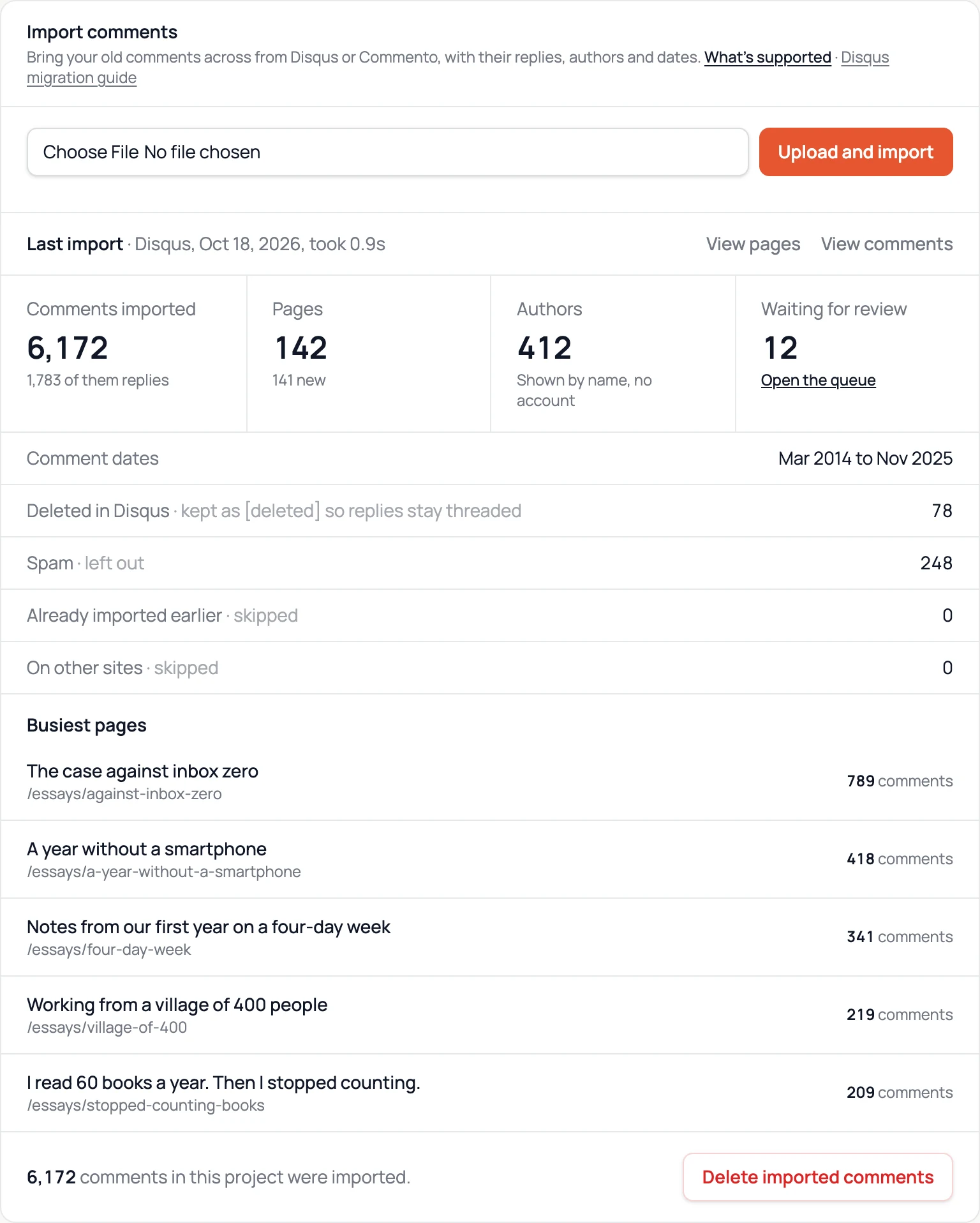
Example: 6,172 comments imported from a blog with 142 posts.
Imported comments don't send notifications or trigger webhooks. Click View comments to read them in your dashboard.
Step 5 Replace the Disqus embed
Find the Disqus code in the template that renders your posts. With Disqus's universal embed it looks like this:
<div id="disqus_thread"></div>
<script>
  var disqus_config = function () { … };
  (function () {
    var d = document, s = d.createElement('script');
    s.src = 'https://your-site.disqus.com/embed.js';
    …
  })();
</script>
Delete it, along with Disqus's comment-count script (count.js) if you use one. If Disqus came from a plugin
or a theme setting, switch that off instead. On WordPress, deactivate the Disqus plugin and install the
Disfora plugin, which puts the comments in place for you. Everywhere
else, add Disfora where the comments should go:
<script src="https://disfora.com/public/disfora.js" async></script>
<div data-disfora-comments></div>
Each post's comments are matched by its address. Disfora treats these as the same address: http and https, with or
without www, with or without a trailing slash, and with tracking tags like utm_source. There are
step-by-step guides for WordPress, Hugo, Jekyll,
Ghost and other platforms.
Step 6 Catch comments posted in the meantime
Readers may have commented on Disqus between your export and the switch. Once Disfora is live, export from Disqus again and upload the new file. Only comments that aren't in Disfora yet are added, and replies to comments you imported earlier still land in the right thread.
Keep the last export file as a backup. You can then close your Disqus account.
What comes across
| In your Disqus export | In Disfora |
|---|---|
| Comments and replies | Imported, threaded as they were |
| Author names | Shown on each comment, without a profile link |
| Dates | Kept |
| Bold, italics, links, quotes and code | Converted to Markdown |
| Thread titles | Used as page titles in your dashboard |
| Unapproved comments | Sent to your moderation queue |
| Deleted comments | Kept as [deleted], so the replies under them keep their place |
| Spam | Left out |
| Comments on other domains | Skipped, and listed in the summary |
| Disqus accounts, avatars and votes | Not in the export, so not imported |
If comments are missing
"None of these comments are on yoursite.com"
The export's threads point at a different domain from the one in your project. The message names the domains it found. Upload the file to the project for that site, or add the domain to this one.
Some comments were skipped as "on other sites"
Usually a staging site or localhost that ran Disqus at some point. That's expected, and the summary lists the domains so you can check.
A post shows no comments after the switch
The post's address has changed since Disqus saw it, for example after a new permalink structure. Delete the imported comments, fix the thread links with Disqus's URL mapper, export again and upload the new file.
Importing from Commento
The same card takes a Commento export: the gzipped JSON file from Commento's data export. Self-hosted Commento and Commento++ write the same file. Upload it under Import comments in your project's settings, as in step 3, and Disfora works out which kind of file it is.
Comments come across under the right pages with their replies, author names and dates, and keep their Markdown. Unapproved ones go to your moderation queue, and ones Commento held as spam are left out. Re-importing and Delete imported comments work the same way as for Disqus. If you're leaving Commento, Disfora and Commento compared covers the rest of the switch.
Questions
It starts within five minutes of the upload. Most exports import in seconds; very large ones take a few minutes. Disfora emails you when it's done.
Yes. It's included on every plan, Free too.
No. Imported comments don't send notifications or emails, and they don't trigger your webhooks.
Their old comments show the name they used on Disqus. The export doesn't include logins, so Disqus accounts don't carry over. To reply or vote, readers sign in to Disfora with Google or an email code, or reply as guests if you turn guest comments on.
Yes. Create a Disfora project for each site and upload the same export to each one. Every project only takes the comments on its own domains.
Yes. Delete imported comments in your project settings removes everything that came from Disqus, along with the pages the import added. Comments readers have posted on Disfora since are kept.
Comparing the two first? See Disfora and Disqus compared.
Ask a question
Something missing or unclear? Ask here and we'll answer in the thread.
Updated October 2026