Disfora

A Jetpack Comments alternative with Google sign-in.

Jetpack 16.4 rebuilt its comment form and took out Google and Facebook sign-in, so readers now log in with WordPress.com or comment as guests. On Disfora they sign in with Google or an email code, and your WordPress comments come with you.

Switching from something else? See every comparison

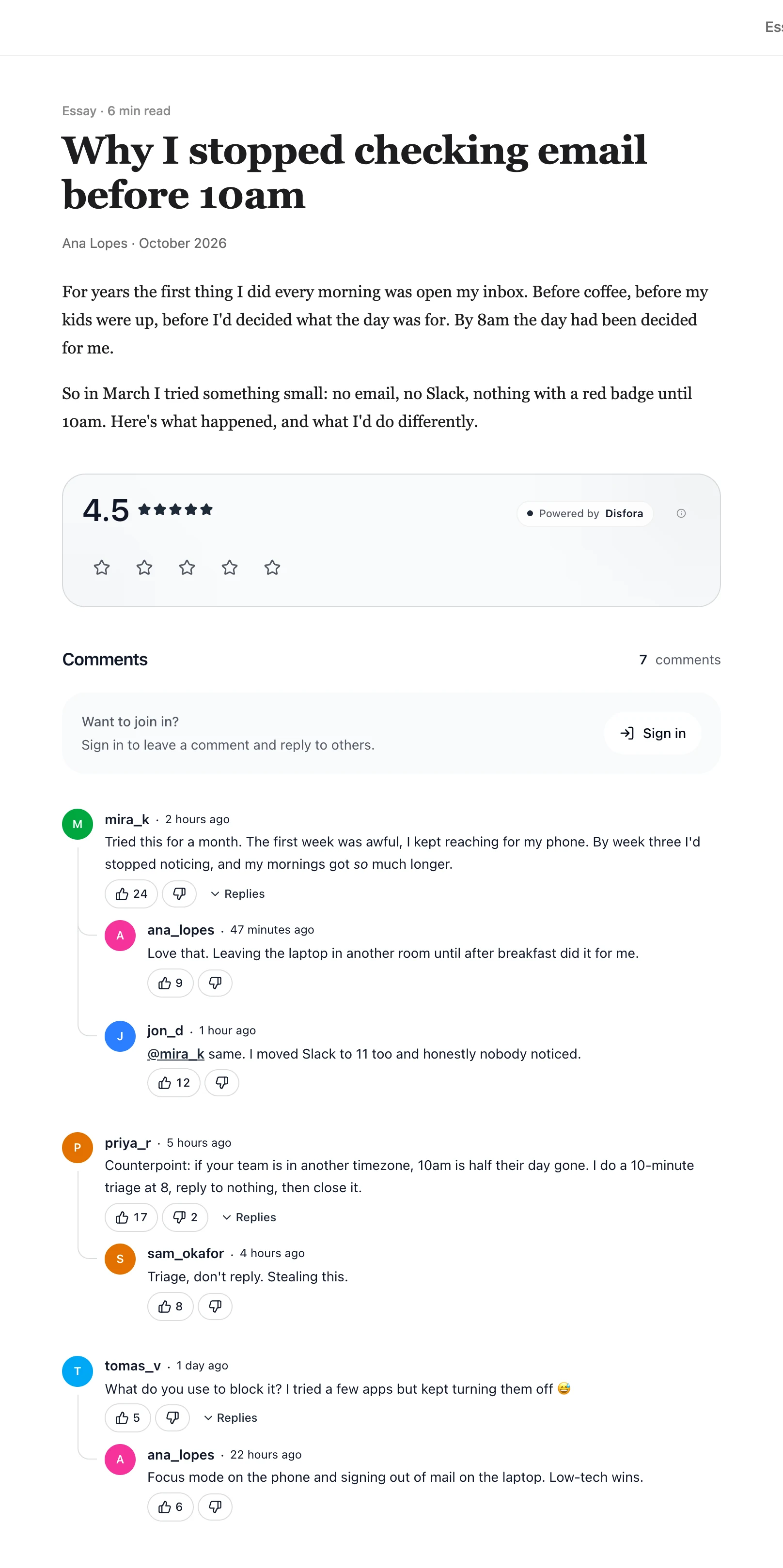
A blog post with the Disfora rating and comment thread underneath

What changed in Jetpack Comments

Jetpack Comments used to load its comment form in an iframe from WordPress.com. In Jetpack 16.4, released on 3 November 2026, it was replaced with a form that renders in your theme and posts to your own site. That's a real improvement for speed and styling.

The rebuild also removed Google and Facebook sign-in. Readers can now log in with WordPress.com or comment as guests with a name and email. Anyone who used to comment with their Google or Facebook account needs a WordPress.com account to keep a signed-in identity.

It still needs Jetpack, a plugin that does much more than comments, connected to WordPress.com. Some site owners find it heavy for what they use. And spam filtering through Akismet isn't part of Jetpack's free plan.

Disfora replaces the comment section through its own WordPress plugin, with no WordPress.com connection. Readers sign in with Google or an email code, guests can comment if you allow them, and the import brings your existing comments across.

Disfora vs Jetpack Comments, feature by feature

Including what Jetpack does better, like costing nothing and working with WordPress.com accounts.

Feature Disfora Jetpack Comments
Status Active Active. Rebuilt in Jetpack 16.4 on 3 November 2026
Hosting Hosted by Disfora. Nothing to install beyond a small plugin, and no WordPress.com connection Part of the Jetpack plugin. Comments go in your WordPress database, and the comment form needs a WordPress.com connection
Embedding Renders in your page through the Disfora WordPress plugin, or one script tag anywhere else Renders in your theme since 16.4. Earlier versions loaded the form in an iframe from WordPress.com
Who can comment Readers who sign in with Google or an email code, and guests with just a name if you turn guest comments on Guests, or readers who log in with WordPress.com. Google and Facebook sign-in were removed in the rebuild
Comments Threaded replies, votes, @mentions, Markdown and GIFs, with reply notifications WordPress's threaded replies, likes from readers logged in to WordPress.com, and email alerts for new comments
Moderation Approval queue, banned keywords, bans and shadow bans WordPress's own, under Settings → Discussion
Spam A Cloudflare Turnstile check for guests, and every guest comment waits for approval Akismet, which isn't in Jetpack's free plan. Jetpack Pro is $29 a month billed yearly, or Akismet is sold on its own
Other widgets Star ratings, polls and forms from the same script The rest of Jetpack: stats, forms, newsletters and more, in one plugin
Your comments Imports your WordPress export. Webhooks send each new comment to your server as it's posted In your WordPress database, and in WordPress's own export
Price Free for one site, then $5 a month for three Free with Jetpack

Based on Jetpack's plugin page, its changelog, the comments package changelog, the comments module, Jetpack Comments support, comment likes, Jetpack pricing and Akismet pricing. Last reviewed November 2026.

What Jetpack Comments does that Disfora doesn't

Free, inside WordPress

If you already run Jetpack, its comments cost nothing and are one switch away, and every comment stays in your WordPress database. WordPress prints them into the page's HTML, so every crawler sees them. Disfora loads comments with JavaScript, which Google runs but some crawlers don't.

WordPress.com accounts and likes

Readers who blog on WordPress.com comment with the account they already have, and can like comments. Disfora readers sign in with Google or an email code, once, for every Disfora site.

Comment emails for free

Jetpack lets readers subscribe to new comments by email on its free plan. Disfora shows reply notifications in the widget on every plan, but sends reply and new-comment emails only on paid plans.

Switching from Jetpack Comments

  1. 1

    Export your comments

    In WordPress, go to Tools → Export, choose All content and download the file. You'll import it into Disfora once your site is added.

  2. 2

    Switch off Jetpack's comments

    Turn off Jetpack's comment form in its Discussion settings just before you install the Disfora plugin. The rest of Jetpack keeps working, and your comments stay in WordPress.

  3. 3

    Add your site to Disfora

    Create a free account, start a project and enter your domain. No card needed.

  4. 4

    Add Disfora to your pages

    Paste the script tag once, and put an empty container where the comments should go. On WordPress, install the Disfora plugin instead: it does this for you.

  5. 5

    Verify your domain

    Prove the site is yours with a meta tag, a file or a DNS record. Comments start showing straight away.

  6. 6

    Choose who can comment

    Readers sign in with Google or an email code. To let them comment with just a name too, add free Cloudflare Turnstile keys in Settings and turn on guest comments.

Your old comments

Upload the WordPress export from step 1 under Import comments in your project's settings. Comments on published posts land under the same posts with their replies, author names and original dates. Pending ones go to your moderation queue, and spam is left out. How the WordPress import works.

Comment likes stay behind, and nothing in WordPress is changed or deleted.

Keep your own copy from day one

Webhooks send every comment to your own server as it's posted, edited or deleted, as signed JSON. They're on the free plan, so your comments don't have to live only in someone else's database.

Questions about switching

No. Jetpack 16.4, released on 3 November 2026, replaced its comment form and removed Google and Facebook sign-in. Readers log in with WordPress.com or comment as guests. On Disfora, readers sign in with Google or a code sent to their email, and you can turn on guest comments too.

Yes. In WordPress, go to Tools → Export, choose All content and download the file, then upload it in your project's settings under Import comments. Comments on published posts come across under the same posts, with their replies, author names and original dates. Ones waiting for approval go to your moderation queue, and spam, pingbacks and trackbacks are left out. The import is free on every plan.

Nothing. They stay in WordPress. On posts that use Disfora they're hidden, and they come back if you switch a post, or the whole site, back to WordPress comments. The import makes Disfora's own copy; it doesn't change or delete anything in WordPress.

Yes. Install the Disfora plugin from the WordPress plugin directory and click Connect with Disfora under Settings → Disfora. It replaces your theme's comments, proves you own the domain for you, and adds a block and shortcodes for ratings, polls and forms.

Yes, if you turn on guest comments in your project's settings. Guests comment and reply with just a name, after a Cloudflare Turnstile check that runs on your page with your own free Turnstile keys. Their comments wait for your approval, and they can't vote. Readers who sign in, with Google or an email code, keep one account for every site that runs Disfora. Guest comments are on every plan.

Yes. One site is free with comments, ratings, polls, forms, moderation and webhooks. Paid plans add more sites, automations, form email alerts, unbranded widgets and team members.

Let readers sign in with Google again

The free plan covers one site, takes a few minutes to set up and doesn't need a card.